
SSBD:BFF Explorer has been implemented to facilitate the search, grouping, filtering, and visualization of image data in SSBD:database
- Others
- Funding
- Database Integration Coordination Program
On Jun 15, 2026, a paper was published in the scientific journal Nature Methods, announcing the implementation of SSBD:BFF Explorer , which enables easy data searching, grouping, filtering, and visualization using image data metadata, in the SSBD biological image data database developed by Team Leader Shuichi Onami and his colleagues at the RIKEN Center for Biosystems Dynamics Research.
SSBD is a platform for sharing and reusing bioimaging data, consisting of the bioimaging data repository SSBD:repository and the high-value biological dynamics data database SSBD:database . SSBD:database publishes thousands of microscopic images and quantitative biological data of various biological objects--single molecules, cells, tissues, and individuals--acquired from diverse species, data sources, and analytical methods, all in OME-NGFF format. These datasets are accompanied by rich metadata, including related publications, species, imaging methods, and licensing information.
With the SSBD:BFF Explorer implemented in SSBD, users can efficiently explore a wide variety of biological images through metadata-driven filtering and grouping. Currently, SSBD:BFF Explorer allows users to search and view data from the OME-Zarr and OMERO dataset collections housed in the SSBD:database. Because OME-Zarr format data supports scalable access, users can visualize only the necessary portions of the data directly from SSBD:BFF Explorer on the web without any hassle, without having to download the entire large dataset.
The implementation of SSBD:BFF Explorer, which acts as a lightweight interface layer for large-scale public bioimaging resources, improves usability by making it easier to explore and browse the OME-Zarr and OMERO datasets in SSBD:database. The research team states that the implementation of SSBD:BFF Explorer will not only advance the utilization of the SSBD:database but also contribute to the creation of a foundation for promoting international collaboration in the sharing of bioimaging data.
For more details, please refer to the published paper titled "Search, organize, aggregate, and share image data with BioFile Finder (BFF) ."
SSBD is developed as a part of JST Database Integration Coordination Program (DICP), "Development of a global data sharing system for bioimaging data " (Principal Investigator: ONAMI Shuichi, Team Director, Center for Biosystems Dynamics Research, RIKEN).
<Data available for viewing in SSBD:BFF Explorer> (Jun 2026)
- SSBD:database OME-Zarr dataset collection 5,957 records
- SSBD:database OMERO dataset collection 11,618 records
Supplementary explanation
・SSBD:database OME-Zarr Dataset Collection: OME-Zarr is a new standard file format for biological image data established in 2023 by the international community "OME-NGFF (Open Microscopy Environment-Next Generation File Format)." It excels at efficiently managing and utilizing multidimensional biological image data in the cloud and is well-suited for AI analysis and as training data for deep learning. The SSBD:database OME-Zarr Dataset Collection contains a large volume of biological image data, including time-series data.
・SSBD:database OMERO Dataset Collection: OMERO is an open platform for microscope image management developed with compliance with the FAIR (Findable, Accessible, Interoperable, and Reusable) principle in mind. SSBD:OMERO contains microscope images in proprietary formats provided by authors, as well as common formats such as TIFF.
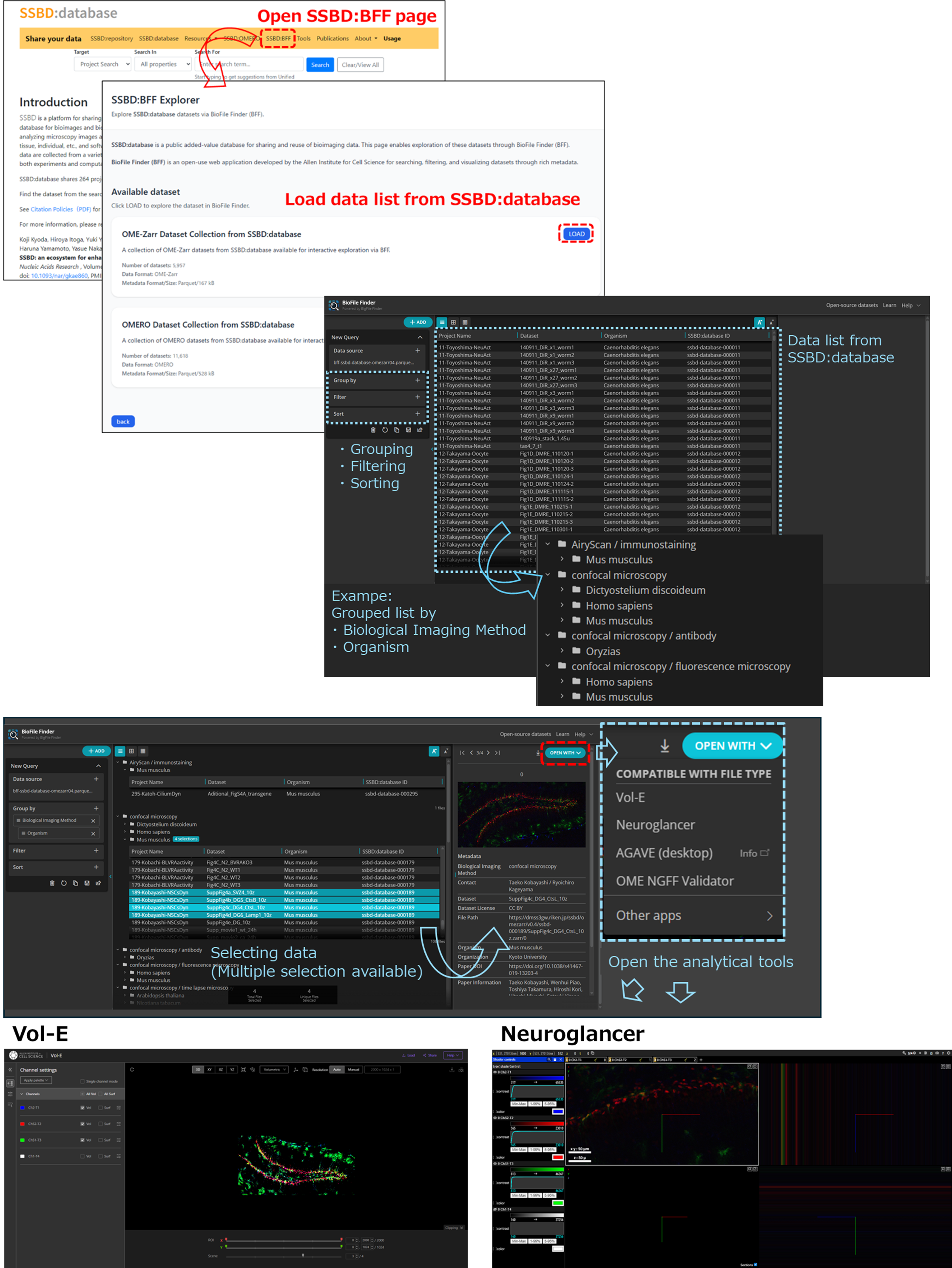
Figure SSBD: BFF Explorer Screen Flow
Open SSBD:BFF Explorer from the SSBD:database tab menu, then click the LOAD button to load the list of SSBD:database OME-Zarr dataset collections or SSBD:database OMERO dataset collections. The figure shows a screenshot of the screen when the SSBD:database OME-Zarr dataset collection is selected. You can group, filter, and sort the samples in the left-hand menu; when you select data from the list displayed in the center, the images and metadata appear on the right. Clicking the OPEN WITH button displays the available analysis tools; clicking one of them allows you to analyze the selected image data in a separate window.
Related Links

